
Install BANGLA FONT for Website – Many websites use Bangla text without converting into unicode. If the website does not embedded bangla font .eot method then the user can not read Bangla text properly. If developer use .eot method to embed Bangla font, then the browser will pool the font from the web server when users’ computer does not available such a font. It is good practice to use .eot system for font embeding then install font by the visitor.
Sabrena tonny mj font download to read NCTB book, National Curriculum & Textbook Board Bangladesh used this Sabrena tonny mj unicode font for text book. You cannot read text book properly with Sarena Tonny MJ font.
Alternatively the user can easily install Bangla font tonnybanglamj to read Bangla text.
-
Download Bangla Font TONNY-BANGLA-MJ
- Sabrena tonny mj bangla font free download
- Download Bangla font boishakhi
- Download Bangla font sutonny free
- Downlaod Bangla unicode font
(unzip zip file then upload to your font folder)
Sabrena Tonny mj
How to install Bangla font to computer?
For Microsoft Windows XP
Installation Instruction:
1. Download & save the font in your PC.
2. Copy the file. ( Select the file and Press Ctrl+C)
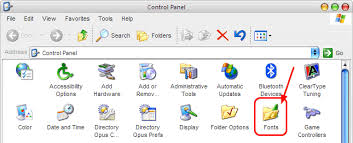
3. Paste the file in Fonts folder. To do so, (Start >Control Panel>Font) open ‘Control Panel’ from ‘Start Menu’. switch to Classic view and Open the ‘Fonts’ folder. Now to paste the file by any of the following ways:
a. Press Ctrl+V, or
b. Click ‘Paste’ icon
c. From ‘Edit’ menu choose ‘Paste’