
Close Menu
MediaBangladesh.netMediaBangladesh.net
    What's Hot

    Mallorca Airport Car Rental: Mistakes to Avoid in 2026

    The Importance of Choosing the Right Clothes for Pole Dancing

    Honor X5c Review in Bangladesh: Slow, Weak Everyday Experience?

    Facebook X (Twitter) Instagram
    • Newspaper Advertisement
    • Free Quote
    • Ad Rates
    • Classified Ad
    • Guest Post
      • Login – Guest Post
      • Registration – Guest Post
      • Guest Post Form
      • Subscription – Guest Post
      • Payment – Guest Post
      • Account – Guest Post
      • Edit – Guest Post
    • Write for Us
    • Contact
    • Currency Converter
    • Gold Price
    Facebook X (Twitter) Instagram Pinterest YouTube LinkedIn WhatsApp
    MediaBangladesh.netMediaBangladesh.net
    • Politics
    • Business
    • Health
    • Food
    • Travel
    • Technology
    • Sports
    • Lifestyle
    • Marketing
    • Education
    • More
      • Internet
      • Pets
      • Entertainment
      • Kids
      • Fashion
      • Women
      • Religion
      • Art Culture
      • Bio
      • Others
    MediaBangladesh.netMediaBangladesh.net
    Home»Internet»Webmin Virtualmin configure for outgoing email
    Internet

    Webmin Virtualmin configure for outgoing email

    By m rJun 5, 2024Updated:Jun 5, 2024No Comments3 Mins Read
    Share Facebook Twitter Pinterest Telegram LinkedIn Tumblr Email Copy Link
    Follow Us
    Google News Flipboard
    Share
    Facebook Twitter LinkedIn Pinterest Email Copy Link

    To configure Webmin for outgoing email, you will typically be setting up and configuring an SMTP server, often using Postfix. Here is a step-by-step guide to configure Webmin for outgoing email:

    Step-by-Step Guide to Configure Webmin for Outgoing Email

    1. Install Postfix

    First, ensure that Postfix is installed on your server. You can install Postfix using the following command:

    sudo apt-get install postfix

    2. Access Webmin

    Open your web browser and navigate to https://your-server-ip:10000. Log in with your Webmin credentials.

    3. Configure Postfix in Webmin

    1. Navigate to Postfix Mail Server:
      • Go to Servers > Postfix Mail Server.
    2. General Options:
      • Click on General Options to configure the general settings.
        • Mail name: Set this to your domain name (e.g., example.com).
        • Internet hostname of this mail system: Set this to the fully qualified domain name (FQDN) of your mail server (e.g., mail.example.com).
    3. SMTP Authentication And Encryption:
      • Click on SMTP Authentication And Encryption.
      • Enable TLS for SMTP communication to ensure encrypted email sending.
      • Set up any required authentication methods if your outgoing mail server requires authentication.
    4. Outgoing Mail Configuration:
      • Navigate to SMTP Server Options.
      • Ensure that Allow connections from is set to All.
      • Set Relay Domains to include any domains you will be sending emails to.
    5. Editing the Postfix Configuration Files:
      • Go to Servers > Postfix Mail Server > Edit Config Files.
      • Select main.cf and add or modify the following lines:
        myhostname = mail.example.com
        mydomain = example.com
        myorigin = /etc/mailname
        relayhost = [smtp.your-isp.com]:587
        smtp_use_tls = yes
        smtp_tls_security_level = encrypt
        smtp_tls_note_starttls_offer = yes
        smtp_tls_CAfile = /etc/ssl/certs/ca-certificates.crt
        smtp_sasl_auth_enable = yes
        smtp_sasl_password_maps = hash:/etc/postfix/sasl_passwd
        smtp_sasl_security_options = noanonymous
      • Note: Replace [smtp.your-isp.com]:587 with your actual outgoing SMTP server and port.
    6. Set Up SASL Authentication:
      • Create or edit the /etc/postfix/sasl_passwd file:
        sudo nano /etc/postfix/sasl_passwd
        • Add the following line, replacing with your actual SMTP server details and credentials:
          [smtp.your-isp.com]:587 username:password
      • Save and close the file.
      • Secure the sasl_passwd file:
        sudo chmod 600 /etc/postfix/sasl_passwd
      • Convert the sasl_passwd file to a Postfix lookup table:
        sudo postmap /etc/postfix/sasl_passwd

    4. Restart Postfix

    Restart Postfix to apply the changes:

    sudo systemctl restart postfix

    5. Test Outgoing Email

    Send a test email to ensure that everything is working correctly. You can use an email client or a command-line tool like mail:

    echo "Test email body" | mail -s "Test Email" [email protected]

    6. Check Mail Logs

    Check the mail logs for any errors or issues:

    tail -f /var/log/mail.log

    Additional Configurations

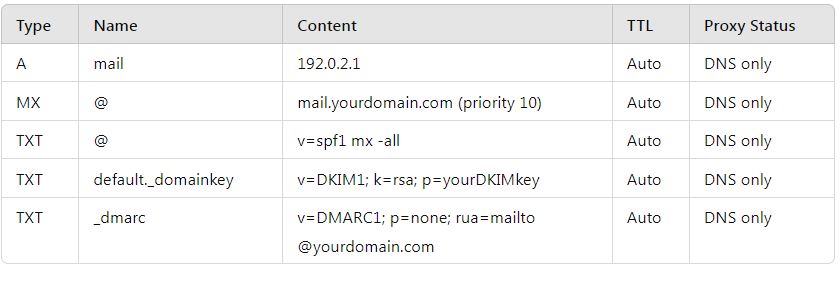
    1. SPF, DKIM, and DMARC:
      • Ensure you have SPF, DKIM, and DMARC records set up in your DNS to improve email deliverability and security.
    2. Configure SPF:
      • Add a TXT record in your DNS settings:
        v=spf1 a mx ip4:your_server_ip -all
    3. Configure DKIM:
      • Install DKIM:
        sudo apt-get install opendkim opendkim-tools
      • Configure DKIM in Postfix and your DNS records.
    4. Configure DMARC:
      • Add a TXT record in your DNS settings:
        _dmarc.example.com. IN TXT "v=DMARC1; p=none; rua=mailto:[email protected]"

    By following these steps, you can configure Webmin for outgoing email using Postfix. If you encounter any issues, checking the mail logs can provide valuable insights into what might be going wrong. If you need further assistance, feel free to ask!

    Follow on Google News Follow on Flipboard
    Share. Facebook Twitter Pinterest LinkedIn Tumblr Email Copy Link
    Previous ArticleProfitable Businesses in Bangladesh with a 100 Thousand Investment
    Next Article Resolve Email Delivery Issues with Cloudflare
    m r
    • Website

    Related Posts

    Resolve Email Delivery Issues with Cloudflare

    Jun 5, 2024

    How to Recover Google Search Engine Driven Visitors for Your Amazon Affiliate Website?

    May 28, 2024

    Is Google Index ChatGPT Written Text from a Blog Website?

    May 28, 2024
    Categories
    Shop Now
    Newspaper Advertising
    Newspaper Advertising Agency in Bangladesh


    Digital Marketing
    Demo
    Latest Posts

    Mallorca Airport Car Rental: Mistakes to Avoid in 2026

    The Importance of Choosing the Right Clothes for Pole Dancing

    Honor X5c Review in Bangladesh: Slow, Weak Everyday Experience?

    How to Choose a Deer Placenta Supplement

    How to Choose a Deer Placenta Supplement: 9 Signs of Quality

    Related Posts

    Resolve Email Delivery Issues with Cloudflare

    Jun 5, 2024

    How to Recover Google Search Engine Driven Visitors for Your Amazon Affiliate Website?

    May 28, 2024

    Is Google Index ChatGPT Written Text from a Blog Website?

    May 28, 2024
    advertise My Business Online for Free

    How to Advertise My Business Online for Free: A Guide for Bangladesh

    May 27, 2024

    Unleashing Innovation: Custom Software as a Catalyst for Business Transformation in 2024

    Apr 24, 2024

    Digital Transformation: Reshaping Industries Through Technology

    Apr 13, 2024

    What is IPAM (IP Address Management)?

    Dec 1, 2023

    4 Important Things to Consider Before Buying a WiFi Extender

    Dec 1, 2023

    List of Newspapers Websites Address

    Jun 5, 2020

    Buy Laptop or Computer Speaker with Microphone

    May 23, 2020
    Product categories
    • Electronics (980)
    • Home Office Furniture (872)
    • Luggage and Travel Accessories (512)
    • Luggage and Travel Gear (2764)
    • Markers (27)
    • Mobile Phones, Tablets and E-Readers (94)
    • Networking and Cloud Computing (189)
    • Office Equipment and Supplies (5)
    • Office Products (7256)
    • Others (14475)
    • Pen and Ink (126)
    • Pencil (125)
    • Pens (23)
    • Travel (364)
    Menu
    • People
    • Help Line
      • Help Line in Dhaka
      • Thana OC Mobile
      • RAB
      • Jobs Sites
      • Mobile Customer Care
    • International
      • Australia
      • USA
      • UK
      • China
      • Canada
      • India
      • Kuwait
      • France
      • Saudi Arabia – KSA
      • Singapore
      • Italy
      • Japan
      • Malaysia
      • Russia
    • Shop
      • Business Industrial and Science
      • Luggage and Travel Accessories
      • Office Products
      • Arts Crafts and Sewing
    • Food
    • Bangladesh
    • Business & Economy
    • Education Articles
    • Health
    • Technology
    • Women
    • Kids or Children
    • Religion
    • Star Cineplex
    • Cinema Halls | Balaka
    • Internet
    • Sports
    • Radio News
    Address

    Advertising Agency

    Office Address:
    87/92B, Green Road, 4th Floor, 79-80, Lift-4,
    Farmgate, Dhaka-1215, Bangladesh.
    Mobile: 01814461234 / 01932222466
    Email: [email protected]
    website: www.mediabangladesh.net

    Author Bio:
    M. M. Rahman is an article writer, IT expert, media professional, and creative strategist passionate about content development, technology, communication, and converting visitors into customers. With extensive experience in IT, marketing, and creative production, he helps brands build strong, engaging, and result-driven digital identities. Contact: info at mediabangladesh.net

    DISCLAIM

    CERTAIN CONTENT THAT APPEARS ON THIS SITE, COMES FROM AMAZON SERVICES LLC., AN AFFILIATE ADVERTISING PROGRAM DESIGNED TO PROVIDE A MEANS FOR SITES TO EARN ADVERTISING FEES BY ADVERTISING AND LINKING TO AMAZON.COM. THIS CONTENT IS PROVIDED ‘AS IS’ AND IS SUBJECT TO CHANGE OR REMOVAL AT ANY TIME.

    Download Ad Rate APP

    android-app

    Download Media Bangladesh APP

    android app

    Facebook X (Twitter) Instagram Pinterest YouTube LinkedIn WhatsApp
    About
    • About us
    • Privacy policy
    • Cookies Notice
    • Latest
    • Contact us
    • Online Advertising Rates
    • Sitemap
    Shop
    • Shop
    • Luggage
    • Office Furniture
    • Office Products
    • Office Storage
    • Electronics
    • Chairs
    © 2026 Media Bangladesh | www.mediabangladesh.net
    • Home
    • Office Products
    • Bangla Waz
    • Guest Post
    • Newspaper Advertisement

    Type above and press Enter to search. Press Esc to cancel.